



The BetFury Withdrawal page was created to collect the main information players need before requesting a payout. The casino entry point helps place the payout process in context, while the operator profile gives extra background on the project. Here you get a clear overview of how to open the withdrawal area, choose the correct coin, check the network and wallet address, review fees and follow the transaction status. The goal is to help users understand every step, avoid common mistakes and withdraw funds more safely inside the official platform environment.
How To Make A Withdrawal On BetFury.com
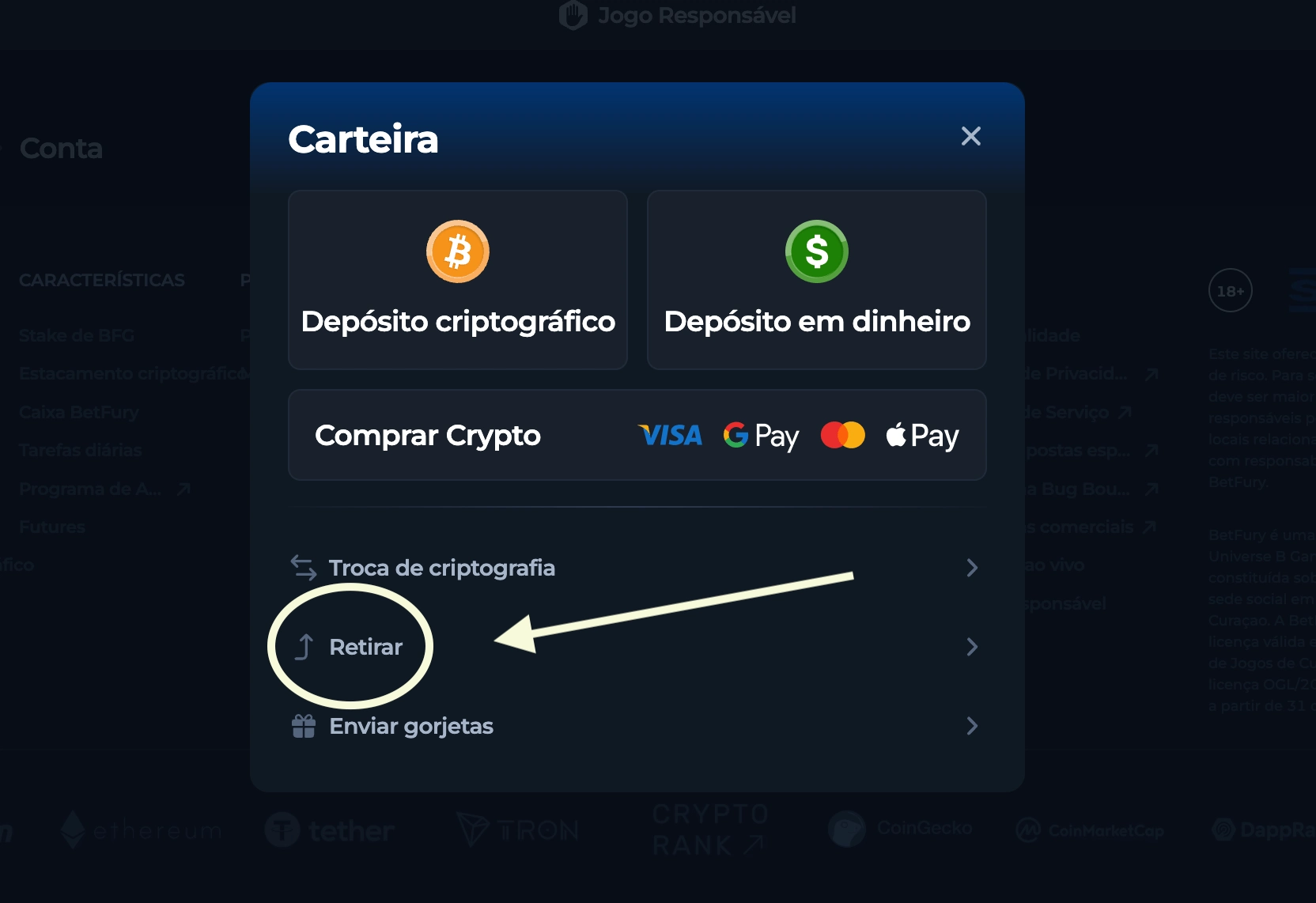
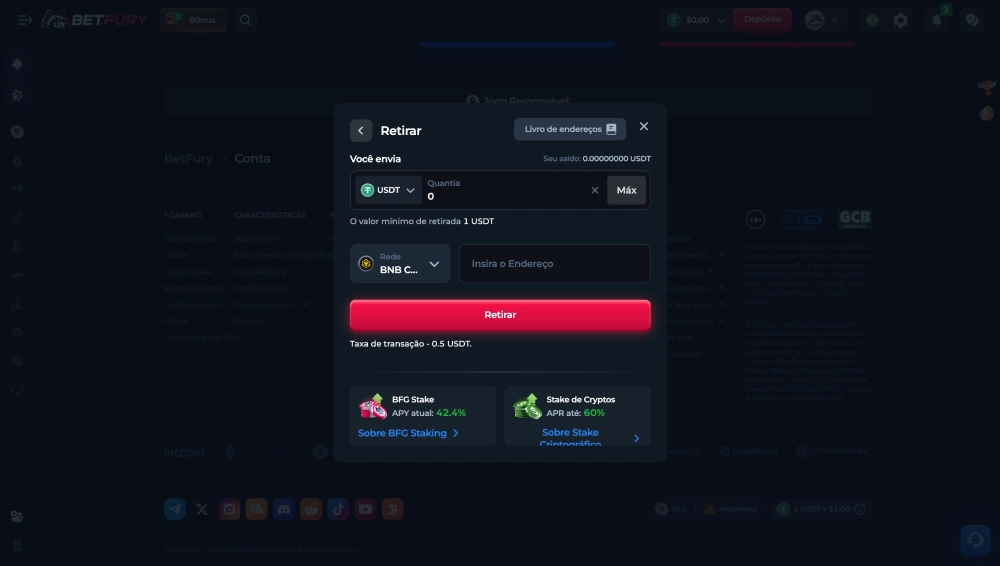
After opening the BetFury Wallet, the player should choose Withdraw to start the payout request. A secure account entry should come before checking balance and history. In this window, select the available coin, enter the amount, choose the correct network and paste the destination wallet address. Before confirming, check the balance, minimum withdrawal amount, transaction fee and all address details, because an incorrect network or wallet can lead to loss of funds.
- Open Wallet Open Wallet and choose Withdraw.
- Choose Coin Select USDT or another available coin.
- Enter Details Enter amount, network and wallet address.
- Confirm Withdrawal Review minimum, transaction fee and send the withdrawal.
How Crypto Withdrawal Works On BetFury
Withdrawing funds on BetFury happens through the Wallet window, in the Withdraw option. The flow is similar to a regular crypto transfer: choose the coin you want to send, enter the amount, select the correct network and paste the destination wallet address. The account setup has to be complete before payout tools become available. After that, review all details and confirm the withdrawal with the Withdraw button.
In the official examples, the withdrawal screen shows fields such as coin, amount, available balance, minimum withdrawal amount, network, address and transaction fee. The funding route is also worth checking to understand where the balance came from and whether any conditions may apply. For USDT, for example, the interface may show a minimum withdrawal amount of 1 USDT and a transaction fee of 0.5 USDT. For ETH, the example shows a minimum of 0.0005 ETH and a transaction fee of 0.0001 ETH. These values may vary by coin, network and current conditions, so always check the information shown in the Wallet before sending.
- Open Wallet and select Withdraw in the side menu.
- Choose the coin you want to withdraw, such as USDT, ETH or another available option.
- Enter the amount and confirm that it meets the minimum withdrawal amount.
- Select the correct network, such as BNB Chain or another network shown on screen.
- Enter the destination wallet address and review the transaction fee before confirming.
Choosing Coin, Network And Amount
In the Withdraw window, the selected coin defines which networks are available and what the minimum withdrawal amount will be. The privacy notice is useful when a payout or verification step involves account data. If you choose USDT, for example, you need to confirm that the selected network matches the network accepted by the destination wallet. The amount should also account for the fee, because the final value received may be lower than the requested value.
Wallet Address And Address Book
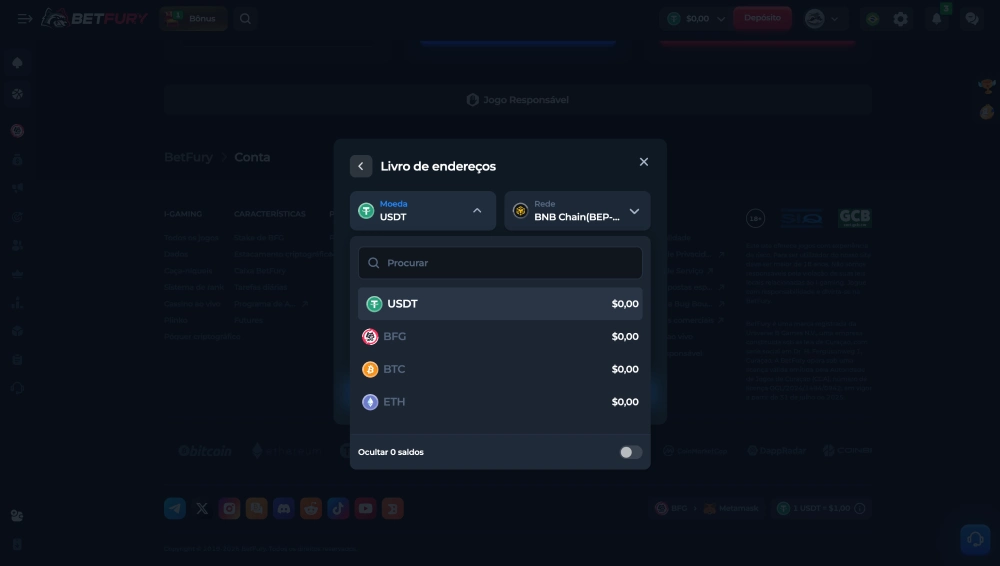
The address field must contain the exact wallet for the chosen coin and network. BetFury may also show an Address Book to make saved wallets easier to use, but it is still important to review every character before sending. Players checking the request on a phone can use the mobile route for quick access. A wrong, incomplete or network-incompatible address can make the transaction irreversible.
Security Before Confirming
Before clicking Withdraw, check balance, minimum amount, fee, network and address. The license information can be reviewed by players who want more platform context before moving funds. If the account asks for additional verification, 2FA or security confirmation, complete that step before trying again. After sending, follow the status until the transaction is processed by the platform and the blockchain network.
BetFury Withdrawal Information Table
The table below summarizes the points to check before sending a withdrawal. The promotion overview is also worth checking because active offers may affect available balance or playthrough conditions. Use the numbers as interface examples and always confirm the current values inside the Wallet, because minimums, fees and networks may change depending on the selected coin.
| Criteria | What To Check | Shown Example | Why It Matters |
|---|---|---|---|
| Coin | Select the coin that will be sent out of BetFury. | USDT or ETH. | The coin defines networks, minimum amount, fee and compatible address. |
| Available Balance | Check whether there is enough balance for the requested amount and fee. | Your balance field. | Without enough balance, the withdrawal cannot be sent. |
| Minimum Amount | Enter an amount equal to or higher than the coin minimum. | 1 USDT or 0.0005 ETH. | Amounts below the minimum may block the withdrawal. |
| Network | Choose the same network accepted by the destination wallet. | BNB Chain in the screen example. | A wrong network can cause permanent loss of funds. |
| Address | Paste the complete external wallet address. | Enter Address field. | An incorrect address usually cannot be corrected later. |
| Transaction Fee | Review the commission before confirming the withdrawal. | 0.5 USDT or 0.0001 ETH. | The fee reduces the net amount received in the wallet. |
| Confirmation | Finish with the Withdraw button and follow the status. | Pending, processing or completed status. | The withdrawal only ends after approval and network processing. |
Common Withdrawal Errors And How To Fix Them
If the withdrawal stays pending for too long, save the transaction ID, coin, network, address used and request time. These details help the assistance team locate the payout and check whether the delay is on the platform, in security confirmation or on the blockchain network. If the main domain is unstable, the alternate path can keep account access available. For cases that require a direct message, the contact page shows the available channels.
Common Errors
- Selecting a network different from the destination wallet network.
- Entering an incomplete, wrong or different-coin address.
- Trying to withdraw below the minimum amount shown in the Wallet.
- Ignoring the transaction fee and requesting more than the available balance.
- Submitting the request without completing 2FA or security verification.
How To Fix
- Compare coin and network on BetFury with the external wallet before confirming.
- Copy the address again and check the beginning, end and compatible network.
- Adjust the amount so it stays above the minimum shown on screen.
- Add the requested amount and fee to make sure the balance is enough.
- Enable or complete 2FA, wait for processing and contact support if the status does not change.